The SG-N64 Is Here!

Posted: 01/30/2016 in Uncategorized

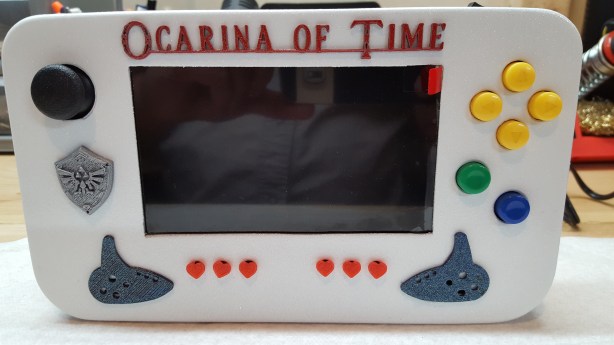
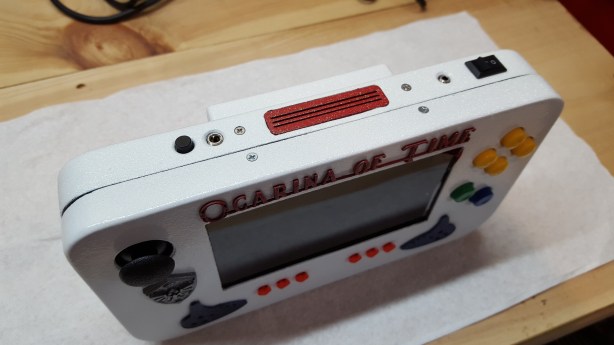
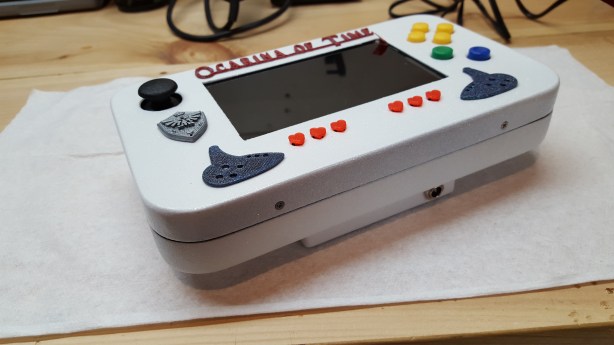
So what seems like after months of down time and waiting, the first version of the new SG-N64 is complete! What is a SG-N64 you may ask? Well, it’s pretty simple actually. The SG-N64 is a Single Game Nintendo 64 Portable Console. Created by the desire to “Immortalize” some of the greatest games of all time, the SG-N64 takes the greatness of a timeless classic and preserves it in a body designed solely for the purpose of playing it.

Alright, that was the dramatic version, but basically, I love Legend of Zelda as a series but Ocarina of Time has always held a certain claim to my devotion to Nintendo and now retro gaming. I dare say that this game may even compete with my all time favorite game “Final Fantasy VII” but in the interest of comparing apples to apples, for Nintendo, this game is it.

So I decided I wanted to try something that could preserve the legacy in a way that I haven’t seen before. Yes, there have been single game N64’s made in the past for TV, but to my knowledge, this may be the first fully portable system dedicated to a single game, but it won’t be the last. I’ve got plans for two more that will take my top 3 favorite N64 games and turn them into their own portable shrines!

That being said, though I  love this system, I built it so I could…well…sell it. My CNC machines are still down and to make sure my now $2k investments don’t turn into a massive paperweight, I need to get them running again an this is the best way to do it! Check out the video below for more info!

20160130_172518

20160128_192032

20160130_172549

20160130_172555

20160130_172531

20160130_172612

System Specs:

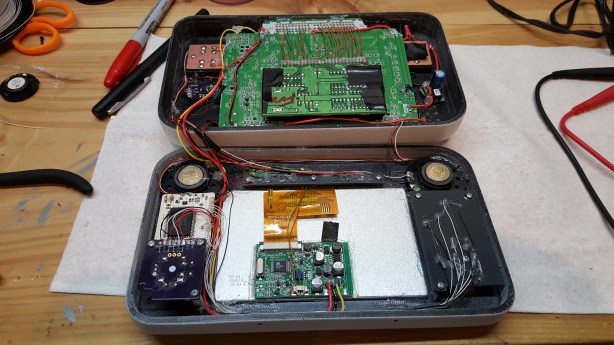
1 – Original N64 Motherboard, Trimmed with trimmed jumper pak.
1 – Original copy of The Legend of Zelda Ocarina of Time Hardwired
2 – 3.7v Lithium/Polymer batteries w/protection circuit and 8.4V Smart Charger
1 – PTH08080WAZ 3.3v Step Down Regulator
1 – Custom Audio Amp by RDC
1 – Custom N64 Controller by RDC
1 – 5″ 16:9 or 3:4 Ratio Display
2 – 40mm Mylar Speakers
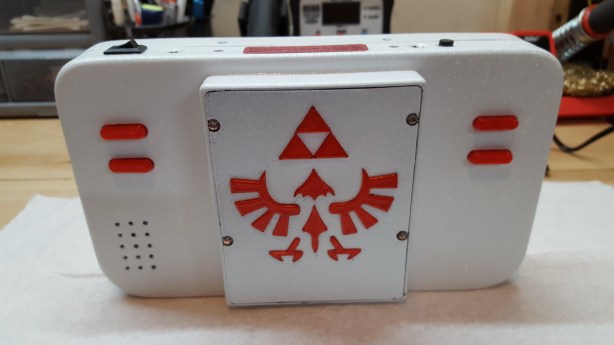
Custom Printed Casing, Buttons (exception C, B&A from a Super Pad)
1 – PS3 Joystick on Custom Breakout Board
1 – Charging Jack
1 – Head Phone Jack w/on-off kill switch
1 – Video output jack & Cable to TV.
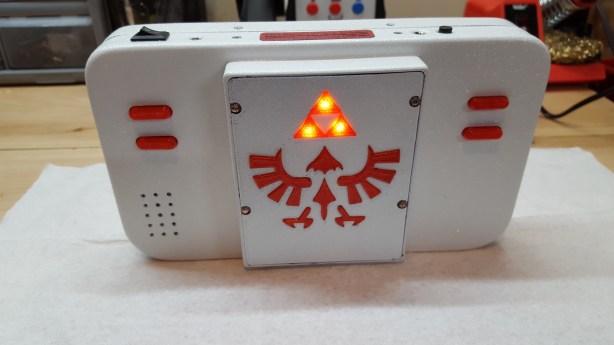
Back-lit Tri Force Logo

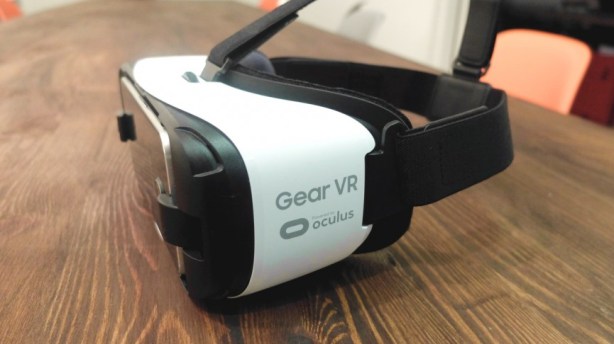
Gear VR

So with the holidays coming to close and the new year in full action, I realized its been yet again a couple months in the way of a meaningful post. Truth be told, the time just hasn’t been there to make progress on my shop, therefore no new projects have been completed either. So in the interest of keeping the blog from stalling, I figured I’d post my first thoughts about a new Christmas present I gave to myself and received yesterday.

As some of you may know, VR is about to take the main stream by storm, with the heavy hitter Oculus and their flagship product, “The Rift” leading the way with its upcoming commercial release. But another product they had been working on with Samsung is the Gear VR headset, which essentially takes the power of the new Samsung Galaxy series of phones and turns it into the main display and processing center for a completely mobile VR experience. This had been released in beta forms for the Galaxy Note 4, but has been re-released for the more updated 6 phone series and I recently just picked up the Galaxy 6 Edge, pretty much for the sole reason of using it with this headset.

oculus-home

The initial boot up was quite simple. As soon an you plugged your phone into the unit, it told you to take it out and install the required software. This happened automatically after that and took about 20 minutes because my Internet connection sucks. But once all the software was installed, and the tutorial was complete, the menu showed itself in the middle of a huge room and the sense of presence this gave me was much more than expected from a headset for $99. It was almost immediate as to how quickly the interface was learned and ease of use the touch pad and back button were to give you a basic input function.

Though this unit can’t give the full VR experience that the Rift will do when it comes out, for 360 Degree photos and videos, this has been a remarkable experience. Just in a day I’ve been too Rome, Paris and Florance. I’ve flown with the Blue Angles and surfed through a blue tunnel wave in the Pacific, road on a speeder on Tatoonie and I’m just scratching the surface. Once my Internet connection is improved (installing Fiber tomorrow), I’ll give the Oculus video a try and see how it feels to have a whole movie theater to myself.

All in all I’ve been very impressed with this headset and it’s getting me even more excited for what the big boys are going to bring to the table when they start shipping. One thing is for sure, though we will still never be able to be in two places at once, these headsets and VR are going to make getting somewhere else a great deal faster.

To my friends, Beta, Aux and Tchay, you guys have done a remarkable job with this in the past few years and I though the original basement is gone, that meet-up allowed me to meet some great people who in turn have put out some amazing products. I look forward to the time I can get out to the west coast again and see what else you guys have brewing!

IMAG2207

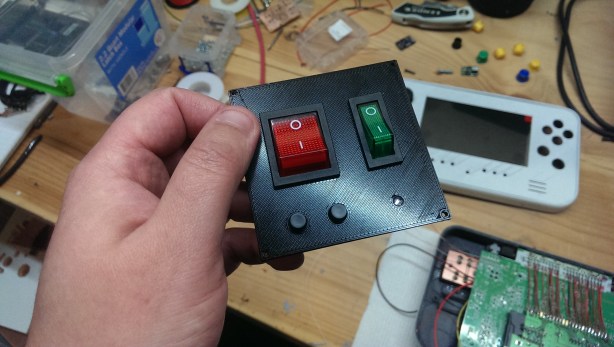
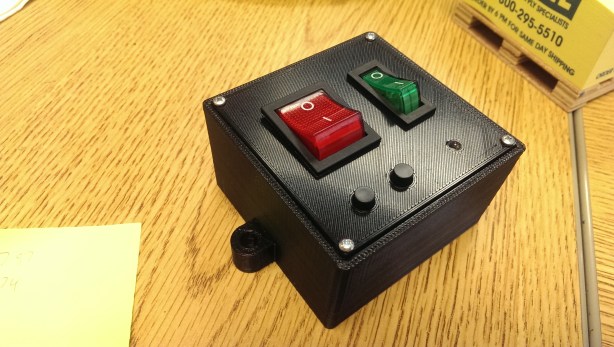
Well on the heels of the worst month ever as far as progress goes, I started on the rebuild of my CNC’s control box. This involves putting all the components of the CNC control box and the PC itself in to a single enclosure which will become the main HUB for the machine. I did this last time with my other machine only it was a table top controller and was made out of wood and sheet plastic. This version is a bit simpler as it’s just using a standard electrical pull box as its housing.

What’s nice about this is as well as consolidating all the components into a single enclosure, I’ll be wiring everything to a single AC input and breaking it out internally to the 3 power supplies that are needed to make it work. The above pic shows the front face plate that I 3D printed for the main power, the pump and the computer.  The pics below shows the full assembly and that will be mounted to the pull box.

IMAG2218

IMAG2219


Have to admit I’m happy with how it turned out an hopefully over the next week or so I ‘ll be able to get this machine up and running again so I can finally stop moving backwards.

The Chaos That Has Been My Modding Life

The Chaos That Has Been My Modding Life

maxtor-hdd

That picture about sums up what my past few weeks have been like in the basement, which all stemmed from upgrading to my new CNC machine. Never has one event lead to such a pain in the ass chain of events that have ended up costing me a hard drive, hundreds of dollars, countless hours of lost time and a complete shake-up of a system I had down pat and knew my way around. So let’s explain how my month went with a list of noteworthy events.

Event 1: The New CNC Machine Arrives

Now it goes without saying that any new machine you bring into your shop is going to take some time to arrange and set up properly. This was certainly the case with my new machine as it was about 4 times the size of the old one and had a couple components that the other one didn’t all which required space. So I had to do some hard remolding of the space set aside to accommodate. That was fine, I knew that was coming and was ready for it. Within a week I had the whole set-up ready and was getting ready for some test cuts.

Event 2: The New CNC Machine Get’s An Upgrade

It was soon after though, I realized that the stock machine really was not equipped the way that I wanted it to be, i.e. I was having trouble getting the machine calibrated properly and went searching online for answers. Long story short, after much conversing with the forums and You Tube users, I decided to upgrade my Stepper Drivers to make the machine cut smoother and be more reliable that the stock version. That was the plan. So after shelling out $140 for the new stepper drivers and spending another week wiring and re-positioning the configuration of the physical control box, my machine ended up completely dead.

Event 3: The New Upgrade Needs an Upgrade To Work

This is where I started to get really pissed. Why weren’t they working? Well, as it turned out, the stepper drivers I put into the control box required a different interface between what I was using before (a 25 pin parallel port) and what they needed to interface with the computer. I was going to have to get a USB converter so the stepper signals could be powered via 5v USB connection. This converter (a UC100) cost $120. I shelled out the cash for that, hooked it up and installed the driver software…and guess what. My G-Code software which I had been using with my old system was too outdated to be compatible with the USB converter. Soooo….

Event 4. The Software Upgrade to the Hardware Upgrade for the Machine Upgrade

Are you seeing a pattern yet? Basically it’s been in the form of a giant middle finger waiting for me at every step of this process. The fortunate part about this upgrade though is that the software the converter needed was a free upgrade, or at least I could get by with the trial version. This new version of Mach3 was about 15 releases ahead of what I was using, but all seemed to be well and good. The program was compatible with the interface, and I could jog my machine so from a functional stand point, everything was in at least working order, though not dialed in. But it was time for a test, so I prepared a .dxf file for cutting, opened the new version of Mach3 to import it and oh, sorry, that import feature which was the key to my whole CNCing operation was no longer a part of program. No, now instead of Mach3 being a simple editor for G-code, i.e. being able to program your layer order, feed rates, depths and spindle speeds, it was now only a g-code reader that you had to load up a .tap file with all that already pre programmed. So yes, you guessed it, I needed yet another piece of software to take my .dxf file and turn them into usable .tap file.

Event 5. The Software Addition to the Software Upgrade

By this point, my head is feeling like it’s going to explode. I mean how many f’ing things am I going to have to buy and relearn to use this thing? Oh but the deal got so much sweeter like a when a carton of milk goes sour and you take a giant swig. The 2.5 axis drawing programs are plenty out there. Some are free which have decent features, some are professional with far more than I’d ever use and some meet in the middle. The program that I found to be the most intuitive to me was one called Sheetcam TNG. This worked very similar to my old 2D Design program I used to use, but this was designed for CAM applications and I quickly fell in love with its features and ease of use. Problem was, the full version was $110, another chunk of change I was getting liberated of. So I bit the bullet, paid for the license and…paypal confirms you have just paid soandso $165USD…wait WHAT?! Son of a bitch…it was 110 Pounds (GBP). OK whatever, I’m done even being mad about this anymore.

Event 6. The Meltdown

With everything that had happened within that month, it finally looked like everything was all in a line and all I was going to need to do was do some fine tuning to get my machine to function smoothly and accurately.  But the fates were again kind to someone else and a total bitch to me, and as I was about ready to install the license file for Sheetcam on my main computer, (the one that controls my 3D printer and is pretty much my life line) the screen made a blink…then another blink, then a great big hue of blue flooded my office, with the pale white words of “Fatal Error” overlaying my monitor….no no no, please no.

Event 7. “Thank you for calling Dell Tech Support, my name is Allen, how may I help you?”

First off, your name is not fucking Allen!!! Second, though I have nothing but praise for the tech support that helped me out, the results ended up being something I could have done myslef if they still shipped backup copies of the OS. But, the back story goes that whatever happened to my computer, it wiped out my OS completely. So after spending a couple hours running diagnostics on the hardware in the machine, it was determined to be a software issue and because my machine was past it’s 1 year warranty, guess what. I needed to purchase a software contract to get the system software so I could bring my system back to life. A $240 software contract. Somehow FML just didn’t do how I was feeling much justice and I was soon FMLing my afterlife as well.

Event 8. The SSD Upgrade

Because we couldn’t be sure at the time if I’d be able to salvage the data on my drive that went down, I decided that it would make more sense get a new Solid State drive to replace my main drive for a fresh install. May as well point out that was $100. Turns out this was the right move because as it was later discovered, my main drive was more or less failing because of a mechanical issue….which really really sucks because if all that data is gone…I don’t even want to think of it. I mean most of my work files and all my CAD/CAM and modding stuff is all saved and backed up on Google Drive so that is secure, but my pictures, my iTunes, my videos were all on the main drive because my back-up drive had crashed a few months before and I was still extracting the raw data and going through that. So the HD has been sent to a professional to see if I can get that recovered which I hoping works. So here I was with a fresh install and all the windows updates and drivers installed. Time to install my most important program, Solidworks. We’re sorry, Solidworks has encountered an installation error and has to close.

Event 9. The Reboot of the Reboot

How can this be? It fucking worked perfectly before, why in the holy hell would it not work on a clean install? Well as it turns out, after hours (and I mean hours upon hours total with this computer meltdown alone) I had to format my new drive and reinstall the OS and before uploading any of the new Windows updates, then install the program. This worked and the process of updates and reinstalling all the software programs started again.

So this has been my month and if I had gotten to Event 10 I’m sure I would have had a mental break down, all because I wanted to “Upgrade” my set-up. I haven’t had the heart or want to tally up the total losses this one event has cost me, but for everything that has gone into this, I better get the best work of my life out of it. This has taken me to a whole new level of frustration and pain out of one of the things that kept me sane and brought me joy (aside from baby and wife). I suppose though seeing what I persevered through does show a devotion and love for the work I do, so hopefully in the near future it will pay off.

I still haven’t got the settings perfect on my machine and I probably have at least 1 more upgrade to go before I get it there, but I think I’m over the hump and within the next couple of weeks I’ll have had a few successful tests that I can regain my confidence. But if I have to endure something like this again, there will be a big fire sale in Bradford for anyone interested.

LOZ Insignia

The speed at which these months are flying by is a little unnerving. Just looking at my last post and realizing that it was a month ago makes me wonder if I’m making the progress I really should be on my projects, but then again, since my time is no longer my own, I think I’m doing pretty damn well.

Anyway, that being said, there are a couple changes since the last post, the biggest that the SNESp that I was commissioned to build ended up falling through. Though I was a but saddened by this as I really wanted to see where this was going to go, it opened up the time for me to get back on some of these back-burner projects I’ve been wanting on, including the new(ish) project that is hinted to above, and finally getting back to my 2nd OUYAp that I’ve been working on for almost 2 years now. Well, I can’t say it’s been two years of steady work, more like maybe three months at the most, just lots and lots of down time.

But regardless, I’ve been having a lot more fun with my 3D printer now that I’ve got a system set up that works more than it fails, and my new CNC machine and software have been just about dialed in so that I can finally get back to were I left off months ago when my little machine crapped out (but that will be it’s own post later).

So hopefully in there near future there will be some progress updates and build logs to read about and certainly a few more videos to gaze at on You Tube when they finish up. In the mean time, hang tight as there will be some pretty cool projects to debut in the coming months!

Sorry it’s been a couple months in between posts. It’s been exceptionally busy these past couple of months but as far as modding and projects are concerned, there’s been a lot of waiting.

First off, the most exciting news is I’ve taken on another commission that started a couple weeks ago. This will be an NTSC Super Nintendo Portable, going over to a buyer in the UK. Yes, UK and NTSC…dunno why, but that’s what he wanted. Now some of you know that after the last shipping fiasco for the N64p that I shipped to the UK back in July, I had sworn I’d never do that again (cost almost $700 to get it there), but the buyer and I have made an agreement and hopefully nothing goes wrong in transit. But anyway, this will be a new project for me as I’ve never done and SNES portable before, though it already looks to be simpler than the N64s. But, I’m also going to try something else new that I’ve never done and that’s to make a portable that will output RGB to the display. For those who don’t know, RGB is an output method that has three different channels that the system outputs to the display, Red, Green & Blue which are then mixed together at the pixel level to make the desired color. This is a far superior method to the standard Composite output which just takes an output signal and mashes it all together through one line, which creates blurry edges and sort of washed out colors.

The way I plan to do this is using a SCRART to HDMI upscaler and use a 5.6″ 640 x 480 display and see if I can get that to work. It’s a lot of extra hardware to cram into a portable, but if it works, the crisp display image will be well worth the extra costs and learning curve. If you want more info on how RGB works in retro consoles, check out the link below and give Bob a like as he’s put an extreme amount of time into his site and the info there is amazingly useful.

The other project I’m working on is another portable N64. This is just kind of a side project but there is going to be a bit of a twist to this one as it’s not going to be a standard N64p. I was going to try and RGB mod this one as well, but the case work was already done as far as the 3D printing was concerned and for what it’s going to be, I really didn’t need to front the additional costs to implement that. But until I get a little bit further into the project, I’m gonna keep this one sealed until I’m ready to show it off!

That being said, I’ve also been working on upgrading my two primary means of case making, i.e. my 3D Printer and my new CNC Machine.

First, my 3D printer has been great for the nearly the full year that I’ve had it. But over the past few weeks, I had been extremely frustrated with it as no matter what I did, the prints I would make would all break loose from the build plate. After more than a dozen failed attempts at printing the N64p case that I’ve been working on, I finally threw the white flag and went searching for answers on the Internet.

My first attempt to help fix the printer was to upgrade the firmware. I had never done it and I couldn’t get the system to print over USB and my readings told me that upgrading the firmware was the way to go. So I found the most updated version of the FlashPrint software and the latest firmware. I installed it and…. bricked the entire system. (Grumble) Turns out I have an older version of the Dreamer and the latest update as I found out the hard way, would kill the system. Only by downgrading to the 1.3V of FlashPrint and the firmware that came with it and through a very odd process to re-install it, was I able to get the system running again. I found the last known version of the firmware that wouldn’t turn my printer into a paperweight and it started working great and I could then use my PC to send directly over USB. But, this still did not fix the lifting issue and I was getting even more frustrated.

So I went looking some more and I had known for a long time that people printing with PLA were having great success using glass print beds. I too had known this first hand as my friend Jon (Hailrazer) Jandran did so on his Makerbot and the results were beautiful.

That’s when I came across Makersome.com, a 3D printing store/community based in California that offers great advice and solutions to 3D printer people everywhere, that had a glass bed kit for the Dreamer. For $40 I was willing to give it a try. It came in earlier this week and with a free Saturday, I decided to break it in. I just have to tell you that the results are nothing short of fantastic! As we speak, the printer is working on the last piece of the N64p casing. 4 print jobs, 4 completions with 0 lifting. I mean these corner have always lifted a bit on every project I’ve done, but using this glass print bed, they match up as if they had been sanded flat. Very very pleased with this investment. So if you are into 3D printing as well have a FlashForge Dreamer or Creator Pro, check out their kit upgrades at Makersome.com Makersome-Logo-FINAL-No-tag-300x59

Lastly, my CNC is under a new upgrade process as well. Even though it was brand new and I love the machine itself, the Chinese have a way keeping costs down which can lead to some questionable results with the final product. In this case, the lack of power with the controller hardware. This is a decent sized machine that pulls some pretty heavy components of it. Though the stepper motors are more than capable of doing the job, the controller that drives them are not. This has been one of the biggest complaints out on the CNC Forums when these machines are concerned. So after I posted a video of the unboxing and my issues, a You Tube user was kind enough to guide me in the direction of a decent upgrade for relatively low money. Long story short, I received in 3 new industrial stepper drivers which I’m in the process of swapping out. I’ve had to take it slow though as I’m not 100% sure what I’m doing with them and just have to make sure I don’t screw anything up. But hopefully once this is complete, I’ll have a machine that can be used to it’s full potential.

So yeah, that’s what I’ve got going on! Like I said, busy as hell, but a lot of down time waiting for parts and materials to come in the mail. Hopefully updates will be a bit more frequent now that I have some real projects going again and we’ll see how these new endeavors pan out!